Translated and adapted from the Japanese article: GRCの代わりに使える検索順位チェックツール比較|無料・有料の選び方
GRC is a rank-checking program well known among Japanese SEO practitioners. If you used it to track Google rankings and it no longer returns them, this guide lists free and paid alternatives and what to check before you choose one. Information was confirmed on October 7, 2026.
GRC no longer checks Google rankings
According to the official GRC update history, version 5.68.312 stopped the Google rank check function and discontinued the Bing rank check function. In the latest history confirmed on October 7, 2026, version 5.68.316 adapts to a Yahoo specification change. In other words, the search engine that GRC officially supports for rank checks is Yahoo.
Support may change. Please check the official GRC download and update history page for the latest information.
Five things to check before you switch
- What you want to measure: Is Google enough, or do you also need Yahoo and Bing?
- Where it runs: Software installed on your PC, or a cloud service used in the browser?
- How often it records: Daily, or a few times a week? Check whether automatic checks are included.
- How many keywords: Going over a plan’s limit can cost extra.
- Past data and AI search: Whether you can import CSV data, and whether AI Overview or ChatGPT observation is included, are separate questions.
Google rank and appearance in AI Overview or ChatGPT are different measures. Decide first whether you only want ordinary rankings or also want to know about AI answers and citations. That makes the choice easier.
Free and paid options compared
| Option | Price and free tier | Good for | Check before use |
|---|---|---|---|
| Google Search Console | Free | Seeing which queries showed or earned clicks for your site, and average position | It is not a dedicated tool that records the rank of keywords you choose every day under the same conditions. Its generative AI performance report shows AI Overview and similar display results. |
| AIOCROSS | Free trial with no expiry. Light plan from JPY 1,000/month (tax included) | Recording Google rank and AI Overview/AI service mentions together on Windows | Check the range of Google rank retrieval, keyword limits by plan and AI observation conditions in the official guide. Not suited to people who mainly want Yahoo or Bing ranks. |
| Nobilista | 7-day free trial. Personal plan JPY 990/month, 150 keywords, 3 sites | Recording Google, Yahoo and Bing ranks automatically in the cloud, without keeping your PC on | Price changes with the number of keywords and sites. Estimate what you need before signing up. |
| BULL | BULL30: JPY 13,200/year (tax included, about JPY 1,100/month), 30 keywords | Daily automatic tracking, viewing by several people, and moving data from other tools | Check the annual price and keyword limit. Check beforehand whether GRC CSV data can be imported, and in which format. |
Prices are based on each official source confirmed on October 7, 2026. Actual amounts may differ depending on campaigns, payment period, tax display and options.
If you want to stay free, start with Search Console
Google Search Console is free. Once you register your site, you can see which pages were shown and clicked in real Google searches, with average position and clicks per query. Google has also announced a generative AI performance report, rolled out to all sites by the end of August 2026, which shows link impressions in AI Overview and AI Mode.
However, Search Console is different from a dedicated tool that tracks registered keywords daily under the same conditions, and its AI report does not give a per-query list like an ordinary rank check. Start free, and consider a dedicated tool when you want finer rank history.
Reference: Google Search Console Help: generative AI performance report (Japanese)
If you want daily automatic records, consider cloud tools
Cloud tools such as Nobilista and BULL run the rank checks on the provider’s side, so you do not need to keep your PC on, and several people can view the results. Because plan prices depend on registered items, first count your sites, keywords and the search engines you need.
If you carry over GRC data, check whether the service can import the CSV “keyword list” or the “rank history”, or both. Some tools migrate only keywords and cannot bring over past rank graphs. To keep old data, export CSV from GRC and save the original files separately.
If you want Google rank and AI mentions together
AIOCROSS is a Windows tool. It continuously records your SEO rank, and whether AI services mention your site or service in their answers to questions you set. It suits people who want to install software on a PC as with GRC, and people who want to see ordinary search and AI answers over the same period.
If you mainly manage Yahoo or Bing ranks, confirm supported search engines on the official pages and compare Nobilista, BULL and others as well. Note that “an AI answer mentioned us” is a different kind of data from AI Overview impressions in Google Search Console. Look at them separately according to your goal.
AIOCROSS at a glance
| Item | Details |
|---|---|
| Product | AIOCROSS. App for Windows 10/11 (64-bit), available from the Microsoft Store |
| Main targets | SEO search rank, Google AI Overview, mentions in ChatGPT, Claude and Gemini |
| Price | Light: JPY 1,000/month (tax included). Standard: JPY 3,000/month (tax included) |
| MCP | Available on the Standard plan |
| Free trial | Trial license has no expiry. 2 sites, 2 SEO keywords per site, 1 AIO question per site |
| AIO retrieval limit | New AIO retrieval in the trial is available for the first 10 days; after that you can view history |
| Sign-up | No credit card, no automatic billing |
Its main feature is that conventional rank and AI mentions are recorded continuously in one app. By comparing the history of rank movements and AI mentions, you can see what changed before and after an action. You can also pass the collected data to an AI assistant you already use, to discuss the current situation, improvement ideas and the next article topics. For a first look at how the app works, see our AIOCROSS review.
How to choose
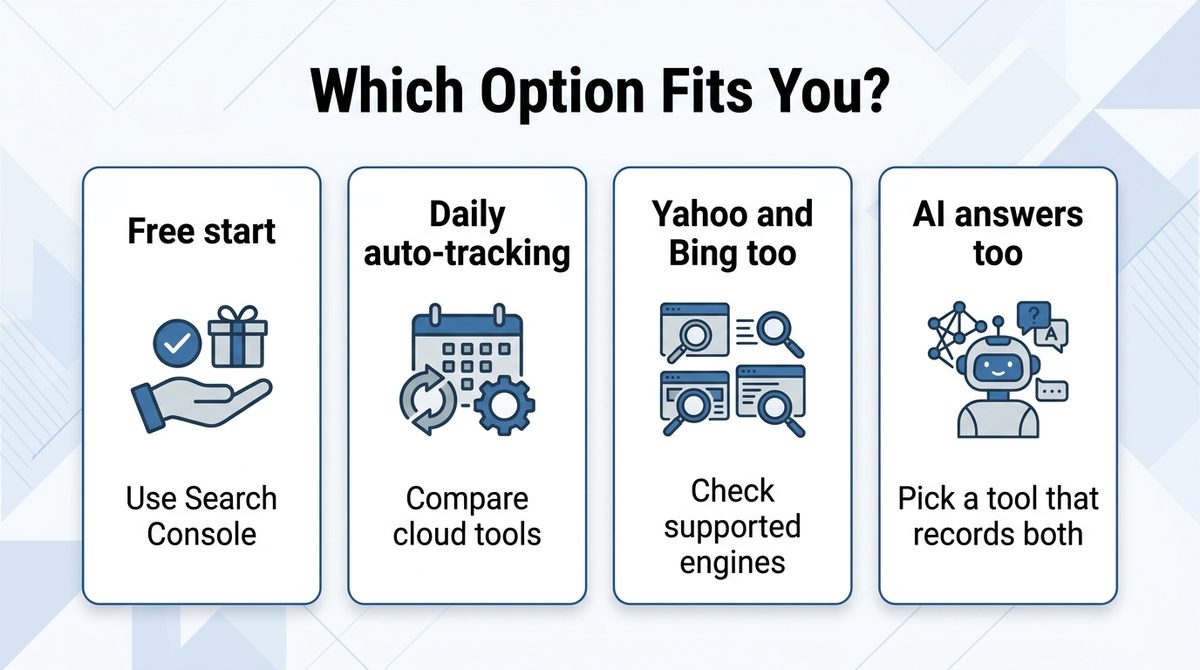
- You want to understand Google search results without spending money: start with Search Console.
- You want to record chosen Google keywords regularly: compare keyword limits and check frequency, then pick a dedicated rank tool.
- You also want Yahoo and Bing: shortlist cloud services that clearly list the engines they support.
- You also want AI Overview and ChatGPT mentions: choose a tool that records both SEO rank and AI answers.
With any tool, it is safer to register a few keywords in the free tier or trial first and check that the screens, frequency and data export fit you.
Summary
The official GRC update history shows that Google rank checks were stopped and Bing was discontinued, so you need another way to keep measuring Google. To start free, use Search Console. To keep a daily rank history without effort, compare dedicated automatic tools. If you also want to see AI Overview and ChatGPT appearances and mentions, treat them as a separate item from SEO rank when you compare.
References: GRC official update history / Nobilista official site / BULL official pricing and features / Google Search Central (confirmed October 7, 2026).
Content, prices and features reflect information confirmed on October 7, 2026. Contract terms and availability may change, so please check each official site before applying.